
Feedback can play different roles throughout an outcomes assessment. An assessor might want to comment on a learner's evidence, explain a criterion-level result or provide overall feedback on the final assessment.
Previously, the different feedback sections looked similar, making it difficult for assessors to know where a particular comment should go. This could also make it harder for administrators to locate feedback when reviewing assessments.
Find out what has changed in the new update below...
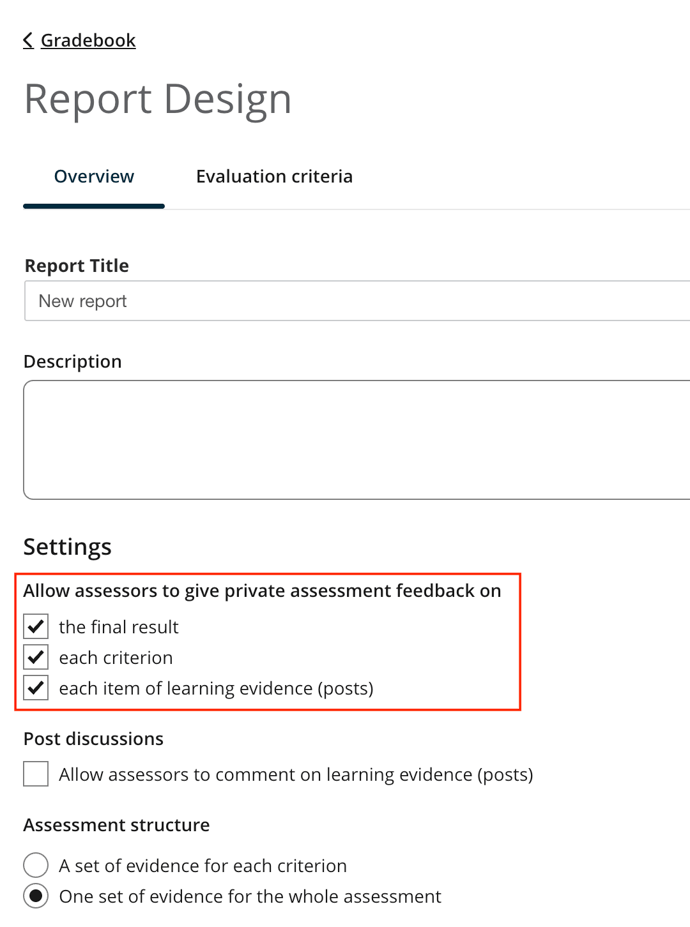
Assessment Designers can now control feedback at three distinct levels:
All three levels are enabled by default, but designers can turn individual feedback levels on or off depending on how the assessment is structured. The assessor flow now uses clearer labels to distinguish each feedback area.
When a post has multiple versions, assessors can also provide separate feedback for each version, ensuring comments remain connected to the relevant learner submission.
Where To Find It:
Outcomes Report Setup > Overview > Feedback Settings
From there, assessment designers can configure which feedback levels are available to assessors.
Clear feedback structures help educators communicate more intentionally. A comment about a learner's overall performance is different from feedback on a specific criterion, and both are different from feedback on the evidence itself.
By clearly separating these levels, educators can place feedback where it is most useful and create a more understandable assessment record for learners and administrators.
Interested in our other tools? Book a demo and discover how our AI-powered LMS can transform your online learning experience!


