
We’re excited to share a recent update to the Gradebook, that saves users time when setting up Gradebooks across courses.
Previously, copying a course did not provide a way to bring the Gradebook across from the source course. This meant teams had to recreate Gradebook structures manually, adding repetitive work to the course setup process.
Read how this has changed below...
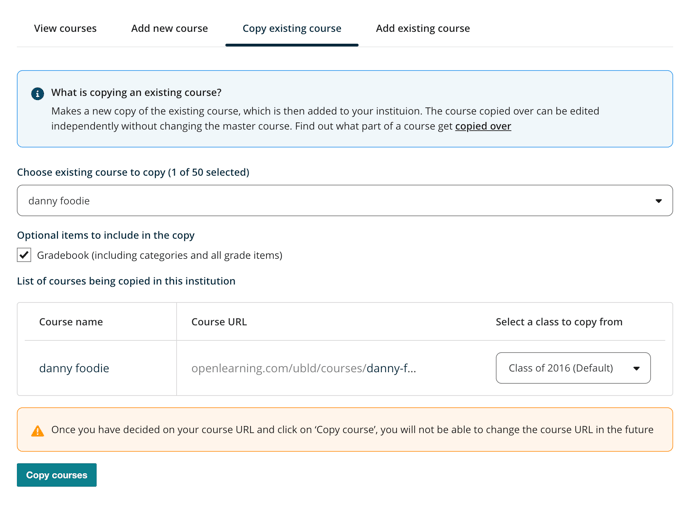
Course Copy now includes an option to copy the Gradebook from an existing course. The Gradebook option is enabled by default when available. When selected, you can choose which class to use as the source for the Gradebook.
The default class is selected automatically, but you can choose another class when needed. This gives course teams greater control over which Gradebook structure is carried into the new course.
Where To Find It:
In Institution settings > Courses > Copy existing course when selecting optional items to copy, choose "Gradebook," then select the source class from the new column that appears.
When setting up a new course based on an existing one, users may want to carry over more than just course content. The Gradebook is an important part of that setup, particularly for institutions managing multiple classes, cohorts or versions of a course.
This update saves educators time by copying the Gradebook over from the source course. This makes setting up Gradebooks across multiple courses faster and less repetitive, especially for customers managing many courses and institutions.
New here? Book a demo and discover how our AI-powered LMS can transform your online learning experience!


